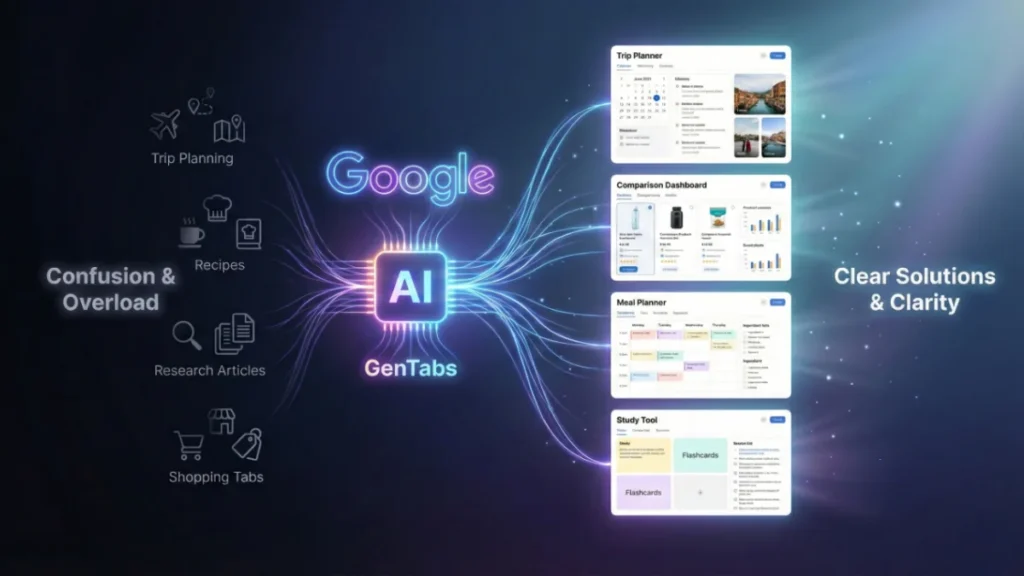
Google GenTabs is Google’s newest AI-powered browsing experiment designed to fix tab overload and transform how we interact with the web. Built with Gemini 3 and accessible through the new Disco app, GenTabs creates interactive mini-apps based on your browsing tasks, letting you research, plan, and build tools using natural language. This guide covers how GenTabs works, how to join the waitlist, and what makes Disco a major shift in the future of web browsing.
Introduction: The Web Is Broken — and Google Thinks It Has a Fix
If you’re like most of us, your browser right now probably looks like this:
- 18+ tabs open
- At least three duplicate pages
- A few “I’ll read later” articles
- A research rabbit hole you lost track of
For years, we’ve trained ourselves to survive tab overload. But with web tasks getting more complex — trip planning, shopping comparisons, school research, budgeting, project coordination — the traditional browser simply hasn’t kept up.
Google knows this.
And for the first time in a long time, they’re attempting to reinvent the browsing experience from the ground up.
Enter Disco, a new “discovery vehicle” from Google Labs, and its first experimental feature: GenTabs, an AI-powered browsing assistant built with Gemini 3 that turns chaos into clarity.
This isn’t just another sidebar AI tool.
It’s Google’s attempt to reshape the future of browsing.
What Is Google GenTabs? (And Why Everyone’s Talking About It)
Google GenTabs is a new browser experiment from Google Labs that uses Gemini 3 to organize your browsing, understand your open tabs, and automatically generate helpful tools based on what you’re researching or trying to accomplish.
Think of it like:
A personal AI browsing assistant + an app builder + a research helper — all in one.
Instead of juggling dozens of tabs, GenTabs reads the context of your browsing and:
- Understands what task you’re doing
- Groups relevant tabs
- Generates interactive mini-apps
- Helps complete tasks without coding
- Provides suggestions based on your browsing patterns
- Always links back to original web sources
In short:
GenTabs turns messy browsing into organized, actionable workflows.
Real-life example:
You’re planning a trip to Japan. Normally, that means:
- 10 tabs for hotels
- 8 tabs for flights
- 5 tabs for itineraries
- 3 pages about cherry blossom dates
- 6 YouTube videos
- And a Google Doc somewhere
GenTabs detects your intent and creates:
- A trip planner dashboard
- Auto-generated itinerary tool
- Budget calculator
- Cherry blossom forecast tracker
- Suggested apps you didn’t even think to ask for
All without you writing a single line of code.
How GenTabs Works?
GenTabs is powered by Gemini 3, Google’s newest and most advanced AI model. Gemini 3 sits inside your browsing environment and watches for patterns.
Here’s the simplified breakdown:
1. It analyzes your browsing activity
Open tabs
Web searches
The content you’re reading
Your chat history with AI
2. It identifies your task
Are you meal planning?
Researching an essay?
Trying to learn guitar?
Looking for a new job?
3. It builds a custom mini-app
GenTabs generates a small, interactive app tailored to your task — planners, comparison tables, calculators, timelines, visual guides, etc.
4. You tweak the app using natural language
Just type:
“Add a section for daily expenses.”
“Sort flights by cheapest first.”
“Show me 3-day itinerary ideas.”
5. Everything stays connected to the original web
Unlike completely generative AI tools, GenTabs always links back to its sources.
Why Did Google Build GenTabs? (The Problem It’s Solving)
Google’s internal research pinpointed a universal pain point:
The browser hasn’t evolved, but user needs have.
We’re using browsers to:
- Plan entire vacations
- Compare products
- Manage finances
- Learn new skills
- Shop across 10 websites
- Research complex topics
Traditional tabs weren’t designed for that.
GenTabs is Google’s attempt at a future where the browser:
- Thinks with you
- Organizes itself
- Generates tools instantly
- Helps you complete tasks, not just find information
GenTabs represents a shift from “searching the web” to shaping the web around your task.
What Is Google Disco? (And Why You Need It for GenTabs)
Disco is Google’s new experimental “discovery vehicle” — a standalone platform for early AI browsing experiments.
Think of it as:
Google Labs → for the future of web browsing.
Disco is where GenTabs lives.
Google’s idea is simple:
Put early experimental features in real user hands, get feedback fast, and shape the future of the browser together.
Key facts about Disco:
- Available first on macOS
- Requires joining the waitlist
- Serves as a testing ground for advanced browsing tools
- Will evolve based on user feedback
- Might eventually influence Chrome’s future features
For now, the only way to try GenTabs is through Disco.
How to Join the Google Disco? Step-by-Step Guide
Google is opening early access only to a limited group of testers, so joining the waitlist is essential.
Here’s how to do it:
Step 1: Go to the official Google Labs page
Search “Google Disco GenTabs” or go directly to Google Labs.
Step 2: Click the “Join Waitlist” button
You’ll see an invite banner for Disco.
Step 3: Sign in with your Google account
Use the account you want access tied to.
Step 4: Choose your platform
Right now, macOS users are prioritized.
Step 5: Submit and wait for approval
Google will notify you via email.
Pro Tip:
People who gave feedback on past Google Labs experiments often get approved faster.
How to Download Disco and Try GenTabs Early
Once accepted, Google sends you the download link.
Disco installation steps:
- Download the macOS installer
- Drag the Disco app into Applications
- Sign in using your Google account
- Enable permissions for browsing activity
- Launch GenTabs from the left-hand menu
Early user tip:
The tool is still experimental — not everything works perfectly, but part of the fun is shaping what comes next.
How to Use Google GenTabs (Beginner-Friendly Guide)
Once you open Disco and activate GenTabs, here’s how to use it:
1. Begin by opening a few tabs related to your task
Examples:
- Flight pages
- Hotel comparison sites
- Recipes
- Research articles
GenTabs reads these signals.
2. Describe what you’re trying to do
At the bottom, you’ll see a prompt box.
Type something like:
- “Help me create a weekly meal plan using these tabs.”
- “Organize my research about climate change.”
- “Turn these job listings into a comparison table.”
3. GenTabs instantly creates an interactive app
This might include:
- A planner
- A comparison dashboard
- A budget calculator
- A data table
- A timeline
- A learning pathway
4. Customize the app using natural language
Say:
- “Add a section for grocery cost estimates.”
- “Sort hotels by rating and price.”
- “Include links to all sources.”
5. Save or export your mini-apps
You can keep them inside Disco or export certain views.
6. Let GenTabs suggest things you forgot
This is where Gemini 3 shines.
Planning a Japan trip?
GenTabs might auto-suggest:
- Cherry blossom bloom tracker
- Visa checklist
- Currency conversion tool
It’s like having an ultra-smart browsing companion.
Google GenTabs Browser Experiment Explained
This is not a Chrome feature (yet).
It’s a Google Labs experiment, similar to how early Chrome experiments shaped the modern browser.
GenTabs operates on a concept Google is calling:
Generative Browsing
Instead of passively browsing the web, GenTabs:
- Responds to your workflow
- Understands browsing intent
- Generates tools to support tasks
- Structures information
- Automates research and comparison
- Makes web discovery more interactive
Why GenTabs matters for the future:
- Browsing is becoming task-based, not tab-based
- Gemini 3 is powerful enough to work in real time
- Users want tools, not just links
- Search is evolving into action, not just information
This experiment could massively influence:
- Chrome design
- Web app builders
- AI-driven research workflows
- How students and professionals use the internet
Gemini 3 Browsing Features Inside GenTabs
Gemini 3 is the brain of GenTabs.
Here’s what it enables:
✔ Real-time tab understanding
Knows what you’re researching.
✔ Intelligent task detection
Identifies whether you’re planning, learning, comparing, or building.
✔ Contextual web app generation
Creates tools on the fly.
✔ Source-anchored results
Every generative element links back to the original website.
✔ Suggestive intelligence
Recommends tools you didn’t think to ask for.
✔ Cross-tab summarization
Summaries without losing source accuracy.
✔ Browsing history–aware insights
Learns from your ongoing session (without storing personal data long-term).
GenTabs is one of the first consumer-facing tools showing the potential of real-time generative browsing.
Can Google’s AI Really Fix Tab Overload? (Yes — and Here’s How)
Tab overload has always been a symptom, not a problem.
The real problem?
People use the browser to do complex tasks, but the browser only offers:
- Tabs
- Bookmarks
- Windows
GenTabs introduces something new:
Task-aware browsing tools.
Instead of opening:
- 11 hotel pages → GenTabs makes a hotel comparison app
- 8 recipe tabs → GenTabs makes a meal planner
- 12 research articles → GenTabs builds a summary matrix
- 7 job listings → GenTabs creates a job tracker
This reduces:
- Cognitive load
- Duplicate tabs
- Friction in switching contexts
- The need for external spreadsheets or apps
- The chaos of modern browsing
It’s not perfect yet — but for many early testers, it already feels like the future.
Who Will Benefit Most from GenTabs?
1. Students
Research papers, notes, citations — all auto-organized.
2. Travelers
Trip planning becomes dramatically easier.
3. Shoppers
Product specs and price comparisons generate automatically.
4. Professionals
Market research, competitor analysis, project planning — simplified.
5. Parents
Homework help, learning dashboards, school research.
6. Creators
Content ideas, brainstorming, workflow tools.
Will GenTabs Replace the Browser?
No — it enhances it.
Think of GenTabs as:
A layer of intelligence on top of traditional browsing.
Long-term, we may see elements of GenTabs move into Chrome, Workspace, or Search.
For now, it’s an experiment — but one with massive implications.
Conclusion
For the first time since tabbed browsing became a thing, Google is rethinking the very foundation of how we use the web.
GenTabs is not just a feature — it’s a philosophy:
The browser should understand your task, not overwhelm you.
With Gemini 3 powering real-time understanding and generative tools, GenTabs represents a glimpse into the future:
- Fewer tabs
- More clarity
- Smarter workflows
- Browsing tools built instantly
- A web environment designed around your goals
If you’re curious about where AI browsing is heading, joining the Google Disco waitlist is absolutely worth it.
Frequently Asked Questions
What is Google GenTabs?
Google GenTabs is an AI-powered browsing experiment built with Gemini 3 that organizes your open tabs, understands your tasks, and creates interactive mini-apps to help you research, plan, and complete tasks faster.
How do I join the Google Disco waitlist?
Visit the Google Labs website, sign in with your Google account, click “Join Waitlist,” and wait for approval. Early access is currently prioritized for macOS users.
How do I download Google Disco to try GenTabs?
Once you’re accepted to the waitlist, Google emails you a macOS download link for the Disco browser. Install it, sign in, and enable GenTabs from the interface.
Does GenTabs work inside Chrome?
Not yet. GenTabs currently works only inside the Disco experimental browser, but successful features may come to Chrome in the future.
Is GenTabs free to use?
Yes — it’s a free experimental feature inside Google Disco. However, availability is limited during testing.
Does GenTabs store my browsing data?
Google states that GenTabs uses your browsing session context but does not retain long-term personal data. It links generative tools to original sources for transparency.
What can I use GenTabs for?
Trip planning, meal planning, research projects, shopping comparisons, content planning, study tools, budgeting, brainstorming, and more.