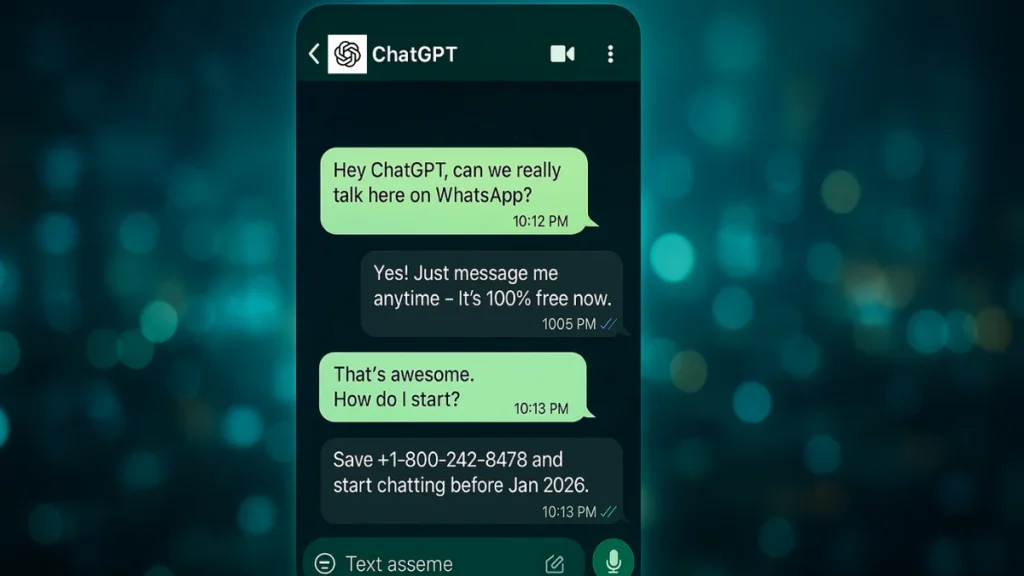
You can now talk to ChatGPT directly in WhatsApp — yes, the same app you message friends and family with. But here’s the catch: free access ends January 15, 2026. That gives you just a few months to take advantage of this incredibly convenient integration before it’s gone.
This guide breaks down how to set it up, what you can do, and why OpenAI is ending free access.
Key Takeaways
- ChatGPT is currently free to use on WhatsApp until January 15, 2026.
- You just need to add the number 1-800-ChatGPT as a contact.
- Linking your ChatGPT account syncs chat history and gives access to GPT-4.
- Works on Android, iOS, and web versions of WhatsApp.
- Free access ends due to Meta’s policy changes — so act fast.
The Rise of ChatGPT Inside WhatsApp
Meta’s WhatsApp is the world’s most-used messaging platform — over 2.7 billion people rely on it every month (Statista, 2025). So it’s no surprise that OpenAI made ChatGPT accessible here, too.
Instead of opening another app or browser tab, you can simply chat with ChatGPT right next to your friends and work groups. It’s fast, familiar, and perfect for casual or professional use.
But — there’s a ticking clock. OpenAI confirmed that free access will end on January 15, 2026, due to changes in Meta’s policies and data-sharing terms. After that, ChatGPT access inside WhatsApp will likely require a paid ChatGPT Plus or Pro plan.
So, if you’ve been curious, now’s the time to try it — for free.
How to Start Chatting With ChatGPT on WhatsApp
Here’s a step-by-step guide to get started in under two minutes:
1. Add ChatGPT as a Contact
Open WhatsApp and add a new contact:
Number: +1-800-242-8478 (that’s 1-800-ChatGPT)
Make sure you include the US country code (+1) if you’re outside the US. Save it under the name “ChatGPT” or anything you prefer.
2. Start a Chat
Once saved, open the chat from your contact list and say “Hi” — you’ll instantly start talking to the AI.
3. Link Your ChatGPT Account (Optional but Recommended)
At the top of the chat, tap ChatGPT → Link Your Account.
This allows you to:
- Sync your chat history with your main ChatGPT account
- Get GPT-4 and image generation access if you’re a paid subscriber
- Preserve your messages even after WhatsApp free access ends
If you skip linking, you can still use ChatGPT for free until January 2026 — you’ll just be chatting anonymously.
What You Can Do Inside WhatsApp
Surprisingly, you can do almost everything you’d normally do on the web or app version of ChatGPT — right inside WhatsApp.
Ask Questions or Get Summaries
Need a quick recipe, trip plan, or explanation of a complex topic? Type it directly into the chat. ChatGPT replies just like a friend — fast and conversational.
Example:
“Summarize this PDF for me in two lines.”
“What’s the best way to explain blockchain to a 10-year-old?”
Use It Like a Smart Search Engine
ChatGPT inside WhatsApp can fetch real-time info from the web — news, weather, sports, and more.
“Give me today’s AI headlines.”
“Who won the Ballon d’Or 2025?”
(Just remember, AI models can sometimes “hallucinate,” so double-check key facts.)
Brainstorm, Write & Edit Content
Writers, marketers, and students are loving this. You can brainstorm ideas, draft posts, rewrite text, and polish essays — all without leaving WhatsApp.
“Write a caption for my AI art Instagram post.”
“Summarize this paragraph to sound more professional.”
Generate Images from Text Prompts
Type a description like:
“Generate an image of a robot chef cooking ramen in a neon-lit kitchen.”
ChatGPT will reply that it’s processing — then send your generated image in a few moments.
Chat About Photos
Snap or upload a photo directly in the chat, and ChatGPT can describe or analyze it.
Perfect for identifying objects, translating signs, or even decoding graphs.
“What’s written on this product label?”
“Identify this flower.”
Manage Chat Settings
Like any WhatsApp contact, you can:
- Change wallpaper
- Mute notifications
- Hide or lock the chat for privacy
- Export or delete conversations anytime
Why Free Access Ends in January 2026
According to OpenAI’s statement, the end of free ChatGPT-on-WhatsApp access stems from Meta’s updated platform policy — specifically around third-party integrations and AI assistant access.
Meta has been rolling out its own Meta AI assistant across Messenger, WhatsApp, and Instagram. The new terms restrict how external AI bots interact with WhatsApp’s APIs, pushing OpenAI to sunset the free service.
Industry analysts note this move as part of Meta’s broader AI strategy — competing with OpenAI, Anthropic, and Google by embedding its own models into its apps.
“Meta wants tighter control over AI interactions inside its ecosystem. It’s about user data, brand control, and AI positioning,” explains Dr. Ravi Kumar, an AI researcher at IIT Delhi.
Why It Matters
This integration was a quiet revolution for billions of WhatsApp users — especially in regions where ChatGPT’s official apps aren’t widely used or available.
Free access means anyone can experiment with conversational AI in seconds — no downloads, no payments, no accounts needed.
After January 2026, ChatGPT access on WhatsApp may:
- Require a subscription (via ChatGPT Plus)
- Be replaced by Meta AI
- Lose chat sync support if not linked before the cutoff
So if you’re curious, now is the perfect time to:
✅ Try it free
✅ Link your account
✅ Save your chat history
Expert Tips for Using ChatGPT Inside WhatsApp
- Use Voice Notes – You can send a voice note, and ChatGPT will transcribe and respond instantly.
- Combine Emojis + Prompts – It surprisingly understands tone and style, e.g., “Write a tweet about AI.”
- Organize Ideas in Threads – Start separate chats for projects like “AI blog ideas” or “Workout planning.”
- Link Early – Linking your ChatGPT account ensures your chat history won’t vanish after the free period.
- Stay Secure – Don’t share passwords or private info; treat it like any online chat assistant.
ChatGPT vs Meta AI Inside WhatsApp
| Feature | ChatGPT | Meta AI |
| Availability | Free until Jan 2026 | Ongoing (built-in) |
| Accuracy | GPT-4 level | LLaMA-based |
| Web Search | Yes | Yes |
| Image Generation | Yes | Limited |
| Custom Prompts | Supported | Basic |
| Sync With Account | Yes | No |
| Data Privacy | OpenAI servers | Meta servers |
If you prefer more depth, creativity, or nuanced writing — ChatGPT remains unmatched. But once it’s gone, Meta AI will likely become the default in-app assistant.
How to Disconnect or Delete ChatGPT From WhatsApp
If you want to stop using it:
- Open the chat → tap the contact name → More options
- Choose Export chat (optional) to save your history
- Tap Delete chat and remove ChatGPT as a contact
If your WhatsApp chat is linked to your ChatGPT account, delete it from chat.openai.com as well to remove it permanently.
Why You Should Try It Now
There’s a limited window before the gate closes. Even if you don’t use ChatGPT often, adding it to WhatsApp gives you instant AI assistance in your pocket — no extra app, no extra steps.
Whether you’re a student, marketer, or just curious about AI, this free access is a rare opportunity.
And remember, after January 15, 2026, this might become a paid feature or disappear altogether.
So go ahead — add 1-800-ChatGPT and see how powerful it feels to have AI right beside your daily chats.
Conclusion
ChatGPT on WhatsApp is the kind of innovation that makes AI feel human and accessible. It bridges the gap between productivity and simplicity, giving billions of users a taste of what conversational AI can truly do.
But like all good things — it won’t last forever.
If you want to experience it for free, now’s your moment.